
How To Google Without AI
Chrome Edition

I have written off a lot of companies since the election of TACO, but one I have not been able to wean myself off of is the Google search engine. I have tried other search engines and to date none compared to Google. I am a pathological Googler.
Then came AI and the enshittification commenced apace. Half the screen taken up by the wrong answer and other garbage. Quotation marks in search ignored.
Below is a workaround that gives you an AI-free default Google search from your browser address bar.
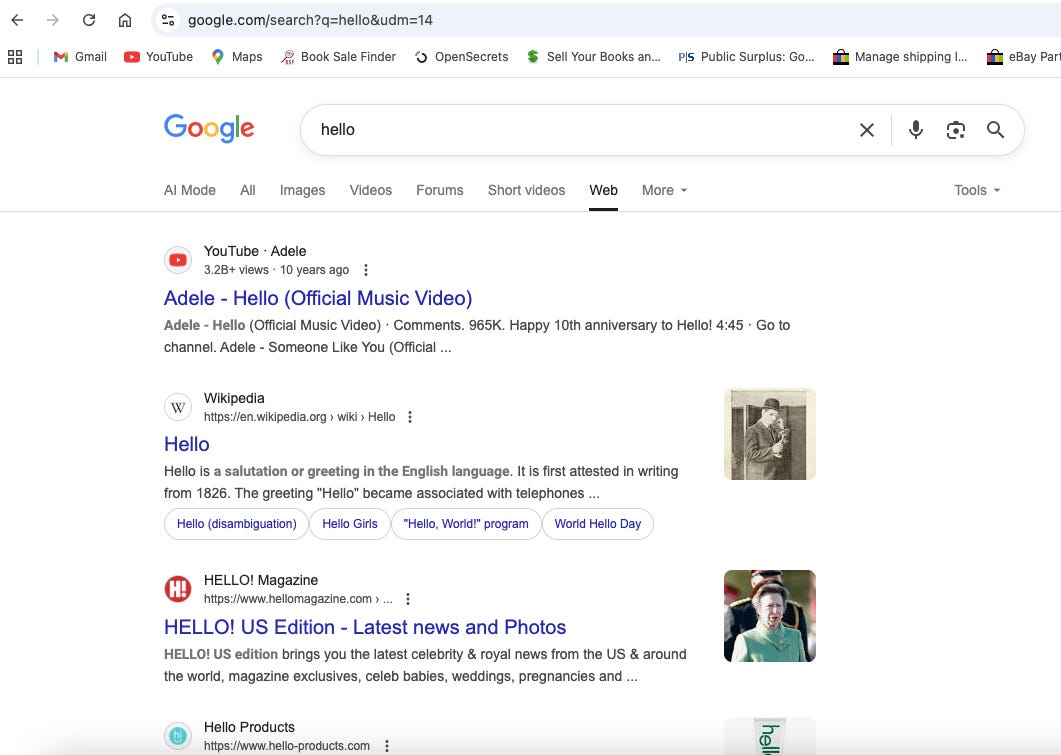
Do a Google search in Chrome and on the results page there should be a “Web” tab at the top of the page. If you don’t see it, click on “More.” This gives you pure web results for your search; no AI, no videos, no ads, etc.
The secret is the “&udm=14” in the address bar. However, it would be absurd to have to type that at the end of every search. The answer is to set the Google Web only search as the default browser.
First, right click on the address bar of your browser. Then select “Manage Search Engines and Site Search.”
Scroll down, you will see a list of search engines. Scroll a bit further to “Site Search.” Click the add button. A screen will pop up - type in “Google Web” or something similar for name, type something short and memorable for nickname, and enter https://www.google.com/search?q=%s&udm=14 as the URL.
Next save and it will appear in the site search list. Click on the three dots to the right and select “Make default.” It will then be listed as the default search engine. (You might need to click the three dots and “Deactivate” you current default browser first.)
Congratulations! Now all your searches from your browser address bar will be blissfully AI free. If you do happen to need a search that includes AI or more, the tabs at the top make it all a single click away.
This calls for a jubilee.
Wow! Thanks, I will be attempting this Google AI riddance soon. Love the music, very talented, breathing again😎💙